
Appearance
Publish Results to the Web
ScoreExpress has a separate website, https://public.scoreexpress.io that you can use to publish competition information to the public. Currently, the site can only be used to publish results, future updates will also allow you to publish schedule information.
List your Organisation on the Homepage
By default, your organisation will not be listed on the homepage of the public website. This is to avoid a list of organisation of which many don't have any public results available.
Whether you want your organisation to be listed on the home page depends on how you want to include the public site in your communication.
In order to activate the listing, you need to check the List Customer Profile On Public Site option in your user profile.
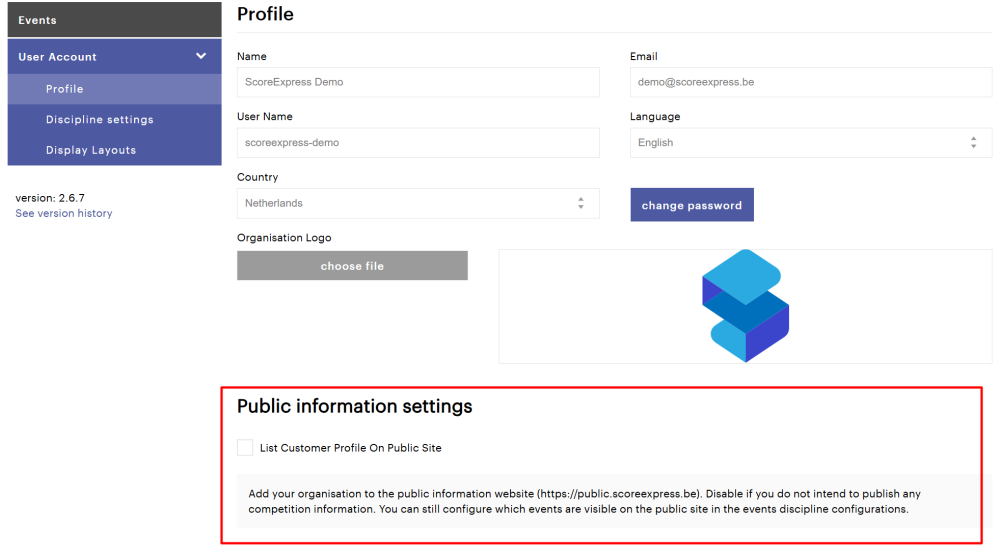
Listing your organisation
Adding your organisation to the list on the homepage will enable users to find you on the homepage of the public website. It will also create a page where all published events of your organisation can be found (and which you can directly link to).
We advise to use this option if you publish events on regular basis.
Not listing your organisation
Not listing your organisation will still allow you to use the site to publish results of your event. But in order to find the page visitors will need a direct link to the event, which you can distribute through your communication channels.
We advise to use this option if you want to have more control over the distribution of the results page link, for example if you prefer users to pass by your own website.
Publish a Competition
You can publish the results of your event by discipline (i.e. if you have multiple added in your event, you can control its publication for each discipline separately).
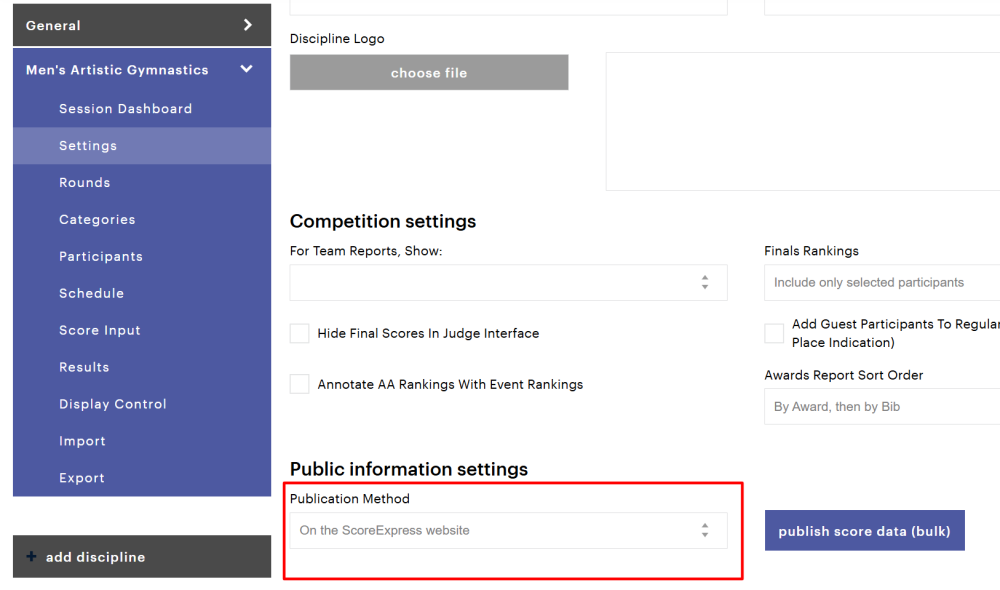
To change the setting, go to a discipline settings page and scroll down to the Public information settings section.
In the Publication Method field, select the option On the ScoreExpress website.
After saving the updated setting, you will find the competition page link directly below the field.
Note that saving the settings with the option Don't publish information, will remove the competition information from the public website.
Embed the Results Page into your Website
If you want your visitors to consult the competition results directly through your own website, you can embed the site on one of your pages.
html
<iframe
  src="https://public.scoreexpress.io/clubs/e6e3ac7024ecfa178be642e2499d4798?embed=event&locale=nl"
  id="scoreexpress-live" title="ScoreExpress" name="results"
  style="border: none; width: 100%; min-width: 100%; min-height: 1000px; height: 1942px;">
</iframe>
You can choose to either use the organisation link (find the exact url on your customer profile in the application) or link to events individually.
Embed parameter
The embed parameter will limit the links in the page header, which allows you to control the navigation user can do.
- event: if you use this value for the parameter, users will not be able to navigate to the overview of clubs/organisations, thus limiting the navigation to your own competitions.
- competition: if you use this value (in combination with a url for a competition, users can only navigate within the selected competition.
Locale parameter
The locale parameter allows you to set the interface language. You can set it fixed to the language preferred by your organisation, or have it synchronised with the language selection of your visitors.
Currently, we support these languages:
- en - English
- fr - French
- nl - Dutch